- Page d'accueil /
- Mobile Phone Accessories /
- Accessoires /
- Maintenance, Upkeep & Repairs /
- Pièces de rechange /
- Screens /
- OLED Display Digitizer Screen Replacement for...
0 ratings




Numéro d'article:
80288681
OLED Display Digitizer Screen Replacement for Note 10 Plus, 6.8 inch Display Digitizer LCD Screen Replacement Touch Assembly with Frame Repair Tools
Numéro d'article:
80288681
XAF 76936
Price Details
Excluding Shipping & Custom charges ( Shipping and custom charges will be calculated on checkout )
*All items will import from États-Unis
0 ratings
Écrire un commentaire
En stock
 Importé depuis la boutique USA
QTY:
Commandez maintenant et recevez votre commande aux alentours du Sunday, Juillet 12
Transaction sécurisée
Ubuy s'engage à protéger votre sécurité et votre confidentialité. Notre système avancé de sécurité des paiements garantit la confidentialité en chiffrant vos informations lors de la transmission grâce aux protocoles AES (Advanced Encryption Standards) et SSL (Secure Socket Layer). Vos coordonnées de paiement sont 100 % sécurisées car nous ne partageons pas vos informations de paiement avec des vendeurs tiers.
nos meilleurs partenaires logistiques


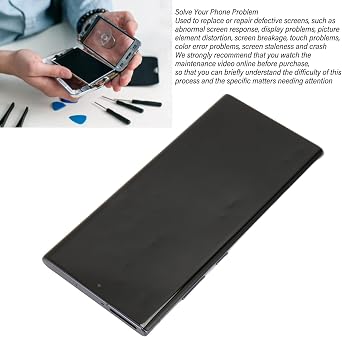
Screen replacement for Samsung Galaxy Note 10 Plus is used to replace or repair defective screens, such as abnormal screen response, display problems, picture element distortion, screen breakage, touch problems, color error problems, screen staleness and crash.

Livraison
rapide

Retour
gratuit*

Emballage sécurisé

Produits 100 % originaux

Conformité PCI DSS

Certifié ISO 27001


Note: Step Down Voltage Transformer required for using electronics products of États-Unis store (110-120). Recommended power converters Acheter maintenant.


Ce qui se démarque
High-Quality OLED
Experience vibrant colors and deep contrasts with the high-quality OLED technology, enhancing your viewing experience on the Galaxy Note 10 Plus.
Complete Assembly Kit
This screen replacement includes a complete touch assembly with frame and essential repair tools, making installation hassle-free even for beginners.
Perfect Fit
Designed specifically for the Galaxy Note 10 Plus (N975U/F), ensuring a perfect fit and restoring your device's functionality without incompatibility issues.
Détails du produit
- Compatible with Samsung Galaxy Note 10 Plus
- Package includes screen replacement and maintenance tool kit
- Used to replace or repair defective screens
- Made of organic light emitting diode for good touch feeling
- Includes 1 x Mobile Screen Replacement, 3 x Screwdriver, 1 x Paddle, 1 x Crowbar, 1 x Sucker
- We strongly recommend watching maintenance video online before purchase for installation guidance
| Package Dimensions | 7.83 x 5.04 x 1.3 inches (19.9 x 12.8 x 3.3 cm) |
| Item Weight | 6.5 ounces (184.28 grams) |
| Item model number | Seroundermqbr9zt8c4 |
| Other display features | Wireless |
| Manufacturer | Serounder |
| Date First Available | November 24, 2023 |
À qui est-ce destiné ?

-
DIY Enthusiasts
Ideal for those who enjoy repairing their own devices and want a quality replacement screen for their Galaxy Note 10 Plus.
-
Budget-Conscious Users
Perfect for users looking to save money by replacing their screen instead of buying a new phone.
-
Repair Technicians
Beneficial for professionals or technicians who regularly perform screen replacements and need reliable parts for repairs.

-
Inexperienced Users
Not suitable for individuals unfamiliar with electronics repair, as installation can be complex and may damage the device.
-
Warranty Holders
Existing warranties may be voided by self-repair; users should consider professional services instead to keep their warranty intact.
-
Non-Galaxy Devices
Incompatible with devices other than the Galaxy Note 10 Plus; ensure proper model compatibility before purchasing.
DESCRIPTION DU PRODUIT
About This Item
Get your Samsung Galaxy Note 10 Plus back to its original glory with this high-quality screen replacement. This 6.8-inch LCD display digitizer screen touch assembly comes with a frame and all the necessary repair tools, making it easier for you to fix your device at home. Our Samsung Galaxy Note 10 Plus screen replacement is a cost-effective solution and provides a seamless fit in your device. Say goodbye to the frustration of dealing with a cracked or malfunctioning screen.
Whether you're looking for a Galaxy Note 10 Plus LCD display, digitizer screen touch assembly, or Samsung screen repair tools, this comprehensive kit has you covered. Don't spend a fortune on professional repair services. With our Galaxy Note 10 Plus screen fix kit, you can save time and money by completing the repair yourself. Enjoy a smooth and responsive touch experience with the Samsung Galaxy Note 10 Plus touch screen digitizer replacement, bringing your device back to life. Invest in this Samsung Galaxy Note 10 Plus screen replacement and restore your device's visual appeal without breaking the bank.
Keep your smartphone looking and functioning like new at a fraction of the cost of a professional repair.
Vous avez une question ? Chattez avec nous
Questions et réponses des clients
-
question:
What is included in the OLED Display Digitizer Screen Replacement kit for Galaxy Note 10 Plus?
répondre: The OLED Display Digitizer Screen Replacement kit includes the 6.8-inch OLED display, digitizer, touch assembly, and frame. Additionally, you'll find essential repair tools to assist you during the installation process. This comprehensive kit is designed to provide everything you need for a successful repair, making it ideal for both professionals and DIY enthusiasts looking to restore their Galaxy Note 10 Plus screen to its original quality and functionality. -
question:
How can I determine if the OLED Display Digitizer is compatible with my Galaxy Note 10 Plus?
répondre: To ensure compatibility, verify that your device model is N975U or N975F, as the OLED Display Digitizer is specifically designed for these variants of the Galaxy Note 10 Plus. Also, check your current screen size and functionalities to match them with the replacement unit. Detailed specifications in the product description help confirm that you are purchasing the correct component, thus avoiding any complications during installation. -
question:
Is it difficult to install the OLED Display Digitizer for the Galaxy Note 10 Plus?
répondre: While the installation of the OLED Display Digitizer can be moderately challenging, the included repair tools and guides significantly aid the process. Many users find it manageable with the right approach, especially when following video tutorials or detailed manuals. This makes it a practical option for tech-savvy individuals looking to save on repair costs by performing the replacement themselves. -
question:
What should I do if my Galaxy Note 10 Plus screen shows dead pixels after replacement?
répondre: If you experience dead pixels after installing the replacement screen, firstly ensure that the display connectors are securely attached. Sometimes a loose connection can cause display issues. If the problem persists, it might indicate a defect in the replacement unit. In these scenarios, you may need to contact the seller or manufacturer for troubleshooting advice or a potential exchange, ensuring you get a fully functional screen. -
question:
Can I use the original frame with the new OLED Display Digitizer?
répondre: Yes, you can use your original frame if it is in good condition and properly fits the new OLED Display Digitizer. However, the replacement kit typically includes a new frame, which ensures a seamless fit and can provide better support for the display. If you're looking to minimize the assembly work, using the provided frame is recommended for the best results. -
question:
How can I avoid damaging my Galaxy Note 10 Plus during screen replacement?
répondre: To prevent damage during the replacement, follow a careful process: use appropriate tools from the kit, work on a clean, static-free surface, and proceed slowly. Ensure that you’re familiar with each step, ideally by watching guides or reading through instructions beforehand. Taking these precautions helps reduce the risk of damaging internal components or the new display, leading to a successful repair. -
question:
What should I do if I accidentally break the OLED Display Digitizer during installation?
répondre: If you break the OLED Display Digitizer during installation, it's essential to assess whether there are any additional components damaged in the process. Carefully clean up any fragments and check the remaining parts of your phone for functionality. You may need to order another replacement if the damage is beyond repair. To minimize future risks, make sure to handle the display with care and follow the installation process precisely. -
question:
Is there a risk of voiding my warranty if I replace my Galaxy Note 10 Plus screen?
répondre: Replacing the screen on your Galaxy Note 10 Plus with a non-manufacturer part may potentially void the warranty. However, if the replacement is done correctly and no other components are impacted, many consumers opt to repair their devices independently. Always check your warranty terms and consider contacting the manufacturer for more specific guidance related to your device warranty. -
question:
How do I test the new OLED Display Digitizer after installation?
répondre: After installation, test the new OLED Display Digitizer by powering on your Galaxy Note 10 Plus and checking for responsiveness across the entire screen. Test different touch functionalities, including swiping, tapping, and multitasking gestures. Additionally, verify the display quality by viewing images and videos, ensuring there are no dead pixels, discolorations, or flickering that might indicate a faulty unit. -
question:
Where can I buy OLED Display Digitizer Screen Replacement for Galaxy Note 10 Plus in Cameroon?
répondre: You can purchase the OLED Display Digitizer Screen Replacement for Galaxy Note 10 Plus from Ubuy in Cameroon. Ubuy offers a wide variety of replacement parts, including the necessary tools for installation. Their platform is optimized for convenience, making it a reliable choice for sourcing quality components for your repair needs.
Serounder Screens Seroundermqbr9zt8c4 Editorial Review
Aucune critique éditoriale trouvée
Avis et évaluations clients
5 évaluations des clients
-
5 étoile
62%
-
4 étoile
0%
-
3 étoile
0%
-
2 étoile
0%
-
1 étoile
38%
Donnez votre avis sur ce produit
Partagez votre avis avec d'autres clients
Avantages
- High-quality LCD display
- Easy installation process
- Includes repair tools and frame
- Excellent touch sensitivity
- Vibrant color reproduction
Historique des prix du produit
Informations importantes
- Limitations : Pour les produits expédiés à l'international, veuillez noter que toute garantie du fabricant peut ne pas être valide ; les options de service du fabricant peuvent ne pas être disponibles ; les manuels, instructions et avertissements de sécurité des produits peuvent ne pas être dans les langues du pays de destination ; les produits (et les matériaux qui les accompagnent) peuvent ne pas être conçus conformément aux normes, spécifications et exigences d'étiquetage du pays de destination ; et les produits peuvent ne pas être conformes à la tension et aux autres normes électriques du pays de destination (nécessitant l'utilisation d'un adaptateur ou d'un convertisseur le cas échéant). Il incombe au destinataire de s'assurer que le produit peut être importé légalement dans le pays de destination. En cas de commande auprès d'Ubuy ou de ses filiales, le destinataire est l'importateur officiel et doit se conformer à toutes les lois et réglementations du pays de destination.
- Tous les produits listés sur Ubuy ne sont pas à vendre, Ubuy étant un moteur de recherche mondial. Les produits sont soumis aux réglementations en matière d'exportation et de commerce.
XAF 76936
Commandez maintenant et recevez votre commande aux alentours du Sunday, Juillet 12
This item is not restrict in my country.(Please click on above link if this item is not restrict in your country, So our team will review and allow.)
QTY:
Transaction sécurisée
Ubuy s'engage à protéger votre sécurité et votre confidentialité. Notre système avancé de sécurité des paiements garantit la confidentialité en chiffrant vos informations lors de la transmission grâce aux protocoles AES (Advanced Encryption Standards) et SSL (Secure Socket Layer). Vos coordonnées de paiement sont 100 % sécurisées car nous ne partageons pas vos informations de paiement avec des vendeurs tiers.
nos meilleurs partenaires logistiques
Livraison transfrontalière la plus rapide
Caractéristiques et avantages
- Samsung Galaxy Note 10 Plus
- Replace or repair defective screens
- Made of organic light emitting diode
- Screen replacement and maintenance tool kit
- Watch maintenance video online before purchase
- 3 x Screwdriver, 1 x Paddle, 1 x Crowbar, 1 x Sucker