- Home Page /
- Computers & Accessories /
- Accessories /
- Keyboards, Mice & Input Devices /
- Graphic Tablet Pens /
- Surface Pro Pen, Surface Stylus for Surface P...
0 ratings






Item #:
93365668
Surface Pro Pen, Surface Stylus for Surface Pro 12/11/10/9/8/7/6/5/4, Surface Go/Laptop/Studio/Book, With Palm Rejection and Rechargeable, 4096
Item #:
93365668
XAF 39189
Price Details
Excluding Shipping & Custom charges ( Shipping and custom charges will be calculated on checkout )
*All items will import from UK
In stock
 Imported from UK store
QTY:
Order now and get it around Wednesday, June 24
Secured transaction
Ubuy works hard to protect your security and privacy. Our advanced payment security system ensures confidentiality by encrypting your information during transmission using AES (Advanced Encryption Standards) and SSL (Secure Socket Layer) protocols. Your payment details are 100% secure as we do not share your payment details with third party sellers.
Our Top Logistics Partners


Fine control with 4096 pressure points, helping with accurate sketching and coloring.

Fast
Shipping

Free
Return*

Secure Packaging

100% Original Products

PCI DSS Compliance

ISO 27001 Certified


What Stands Out
Palm Rejection
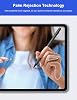
Experience seamless writing and drawing without interruptions. The advanced palm rejection technology ensures that only the pen's input is recognized, allowing for a natural and comfortable user experience on any Surface device.
High Pressure Sensitivity
With 4096 levels of pressure sensitivity, this stylus allows for precise lines and an authentic writing feel. Perfect for artists and professionals, it adapts to your style for varied thickness and shading.
Magnetic Attraction
Easily attach the Surface Pro Pen magnetically to your device, ensuring it’s always within reach. This convenient feature minimizes the risk of loss and enhances portability for on-the-go creativity.
Product Details
- 4096 Pressure Sensitivity: Fine control with 4096 pressure points,helps with accurate sketching and coloring. Surface go pen allows for shading or increased detail, just adjust the line's thickness by increasing or reducing the strength, to make your more casually and freely when browse the Internet, take notes, draw watercolors, draw sketches or mark documents.
- Palm Rejection Technology & Magnetic Adsorption: Surface Pro 7 pen with palm rejection capability allows you to rest your hand comfortably on the screen,Ink flows from the tip of Pen to your screen with virtually no lag,and no breaking points when writing either, always there and ready to jot down when inspiration strikes. The Surface stylus has a magnetic design and can be perfectly attached to your Surface Pro/Go/Book magnetically.
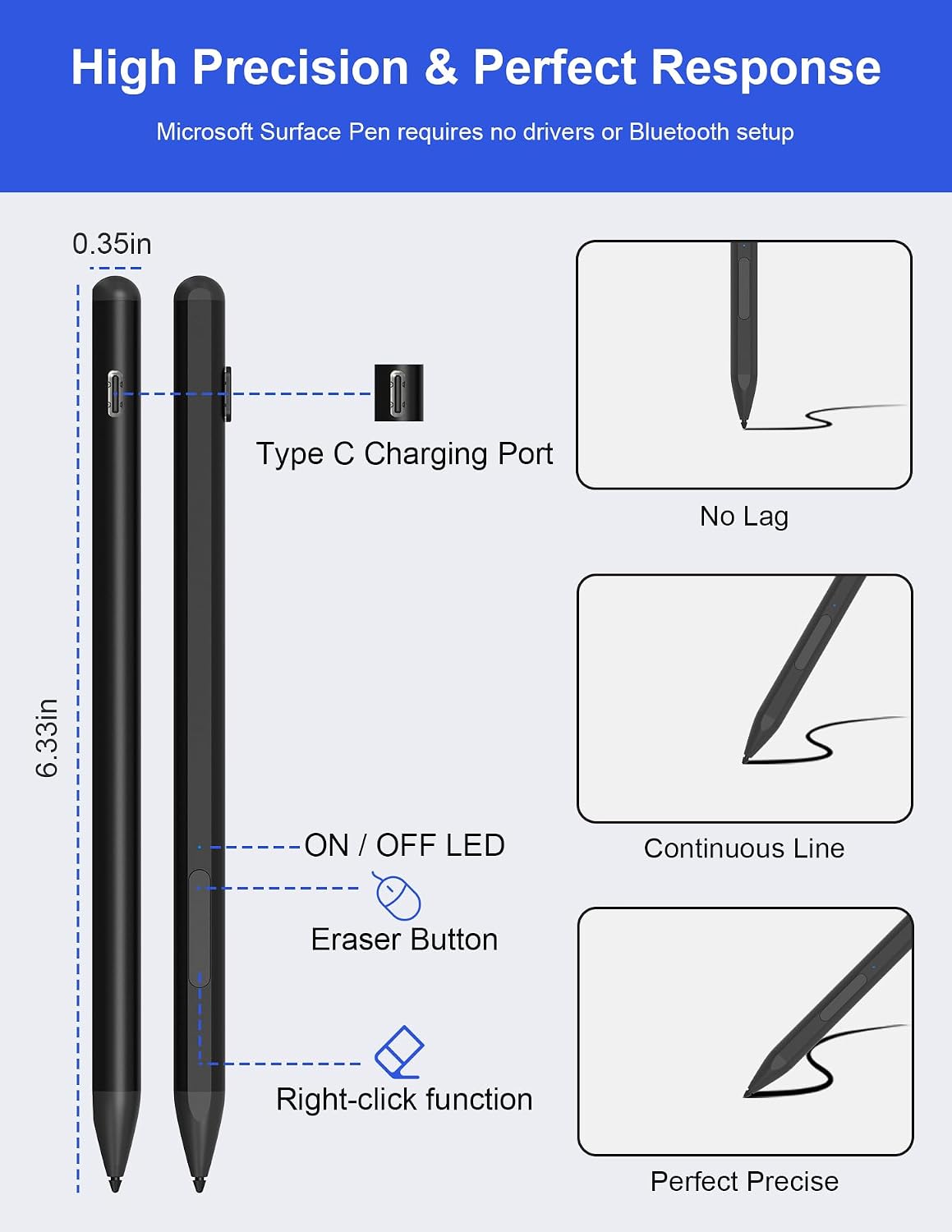
- Type C Fast Charge & LED Light: Surface go pen only takes 30 minutes to fully charge for 60 hours of battery life. When the indicator light is red, it means the battery is low/charging. When the indicator light is blue, it means it is fully charged/in use, letting you know the battery status in time. The surface pro 9 accessories automatically powers off after 10 minutes of inactivity. This feature greatly enhances its efficiency and preserves battery life.
- Eraser and Right-click functions: This surface book pen is equipped with two buttons to help you easily switch between eraser and right-click functions, thereby improving your work efficiency. No need to manually change tools anymore, simply press the button to quickly switch functions, saving you valuable time and energy. The upper key is the eraser, and the lower key is the right mouse button.
- Wide Compatibility: Windows surface pen suitable for Surface Pro 11/10/9/8/X/7/6/5/4/3; Surface Go 3/ Go 2/ Go; Surface Laptop 5/ Laptop 4/ Laptop 3/ Laptop 2/ Laptop; Surface Book 3/ Book 2/ Book; Surface Studio 2/ Studio.
| Number of Batteries | 1 Unknown batteries required. (included) |
| Battery Average Life Standby | 25 days |
| Compatible Devices | Surface Pro 11/10/9 / 8 / X / 7 / 6 / 5 / 4 / 3 / Surface 3; Surface Go 3 / Go 2/ Go; Surface Laptop 5 / Laptop 4 / Laptop 3 / Laptop 2 / Laptop; Surface Book 3 / Book 2/ Book; Surface Studio 2 / Studio |
| Charging Time | 30 minutes |
| Battery Description | Alkaline |
| Minimum Required Operating System Version | Windows 10 |
| Colour | Black |
| Enclosure Material | Aluminium |
| Brand Name | Rytaki Pro |
| Model Number | SP02-BK-J |
| Are Batteries Included? | Yes |
| Are Batteries Required | No |
| UPC | 671891103400 |
| Unit Count | 1.0 count |
| Manufacturer | Rytaki Pro |
| Country of Origin | China |
| Brand | Rytaki Pro |
| Material | Aluminium |
| Compatible devices | Surface Pro 11/10/9 / 8 / X / 7 / 6 / 5 / 4 / 3 / Surface 3; Surface Go 3 / Go 2/ Go; Surface Laptop 5 / Laptop 4 / Laptop 3 / Laptop 2 / Laptop; Surface Book 3 / Book 2/ Book; Surface Studio 2 / Studio See more |
| Are batteries included | Yes |
| Batteries required? | No |
| Item Weight | 0.1 lbs (50 grams) |
Who Should Buy?

-
Digital Artists
Ideal for artists who need precision and pressure sensitivity for intricate designs and sketches on their Surface devices.
-
Note Takers
Perfect for students or professionals who prefer writing notes digitally with a natural feel and palm rejection feature.
-
Engineers/Designers
Beneficial for engineers and designers who utilize CAD software, requiring accuracy and control on high-resolution displays.

-
Casual Users
Not essential for users who only browse the web or use basic applications without drawing or detailed note-taking.
-
Budget Shoppers
Less suitable for those who need a low-cost stylus as the Surface Pen is on the higher end of the price spectrum.
-
Gaming Enthusiasts
Not ideal for gamers, as it's designed primarily for productivity and creative tasks rather than gaming interaction.
Product Description
Have any Query? Chat with us
Customer Questions & Answers
-
Question:
How long does it take to charge the Surface Go Pen?
Answer: It takes just 30 minutes to fully charge the Surface Go Pen. -
Question:
What devices is the Surface Go Pen compatible with?
Answer: It is compatible with various Surface models, including Pro, Book, Laptop, and Go series. -
Question:
Does the stylus have palm rejection technology?
Answer: Yes, the stylus features palm rejection technology for comfortable use.
Rytaki Pro Graphic Tablet Pens SP02-BK-J Editorial Review


**** The Rytaki Pro Surface Pen for Microsoft devices has garnered a mix of feedback from users, illustrating its strengths and weaknesses in both functionality and design. Customers appreciate the affordability and compatibility of the pen with various Microsoft devices, including the Surface Pro series and Surface Laptop models. Users have reported that, despite its lightweight feel, the pen performs reliably with features such as palm rejection and 4096 pressure sensitivity, allowing for varied drawing and writing styles. The magnetic grip that securely attaches the pen to the device is another frequently praised feature, alongside the rechargeable battery and included charging cable that ensures convenience. Many users note that the pen works seamlessly right out of the box without the need for pairing, making it accessible for new users. The extra interchangeable nibs and sturdy Construction enhance its usability, particularly for those engaged in casual note-taking and digital sketching. However, the reception isn’t entirely positive. Some reviewers have criticized the pen’s sensitivity, stating that it requires a firmer tap for selection compared to the OEM Microsoft stylus. This can interfere with smooth writing or drawing experiences, especially for more artistic endeavors. The pen has also been found to exhibit jitter on straight lines, which may disappoint digital artists seeking precision. The button functions, particularly for erasing and right-clicking, have sparked confusion for some users due to their positions differing from those found on other styluses. While it serves as an adequate backup stylus, there are suggestions from users that similar products at the same price point may perform better. Overall, the Rytaki Pro Surface Pen stands out for its price and functionality, though it may not meet the expectations of users requiring the highest level of responsiveness or precision. **
Customer Reviews & Ratings
106 customers ratings
-
5 Star
43%
-
4 Star
22%
-
3 Star
3%
-
2 Star
10%
-
1 Star
22%
Review this product
Share your thoughts with other customers
Pros
- Affordable alternative to OEM pens
- Palm rejection and 4096 levels of pressure sensitivity
- Excellent magnetic grip and ease of attachment to devices
- Includes rechargeable battery and extra nibs
- User-friendly with no need for pairing
Cons
- Requires more pressure for selection, less responsive than OEM stylus
Product Price History
Important information
- Limitations : For products shipped internationally, please note that any manufacturer warranty may not be valid; manufacturer service options may not be available; product manuals, instructions, and safety warnings may not be in destination country languages; the products (and accompanying materials) may not be designed in accordance with destination country standards, specifications, and labeling requirements; and the products may not conform to destination country voltage and other electrical standards (requiring use of an adapter or converter if appropriate). The recipient is responsible for assuring that the product can be lawfully imported to the destination country. When ordering from Ubuy or its affiliates, the recipient is the importer of record and must comply with all laws and regulations of the destination country.
- Not all the products listed on Ubuy are for sale, as Ubuy is a global search engine. Products are subject to export/trade regulations.
XAF 39189
Order now and get it around Wednesday, June 24
This item is not restrict in my country.(Please click on above link if this item is not restrict in your country, So our team will review and allow.)
QTY:
Secured transaction
Ubuy works hard to protect your security and privacy. Our advanced payment security system ensures confidentiality by encrypting your information during transmission using AES (Advanced Encryption Standards) and SSL (Secure Socket Layer) protocols. Your payment details are 100% secure as we do not share your payment details with third party sellers.
Our Top Logistics Partners
Fastest cross-border delivery
Features & Benefits
- 4096 pressure sensitivity for precise sketching and coloring.
- Palm rejection technology allows comfortable hand placement on screen.
- Fast charging in just 30 minutes for up to 60 hours of use.
- Two-button functionality for quick eraser and right-click access.
- Magnetically attachable design for easy storage on Surface devices.
- Compatible with a wide range of Surface and other brand devices.